June 8th, 2026
Improved
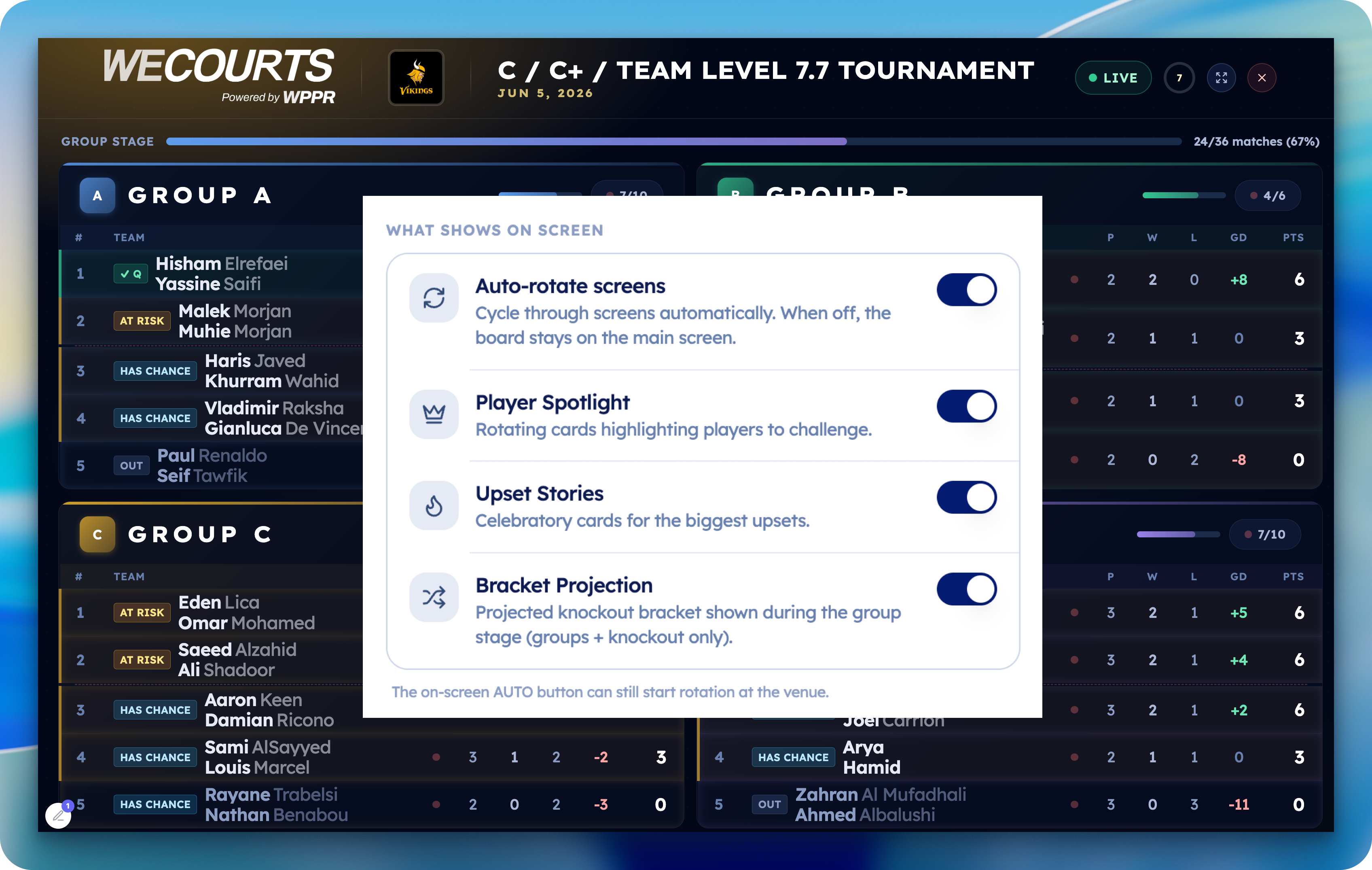
Decide exactly what plays on the big screen, and change it on every TV in seconds — without ever walking over to the screens.
Your TV, your rules — now controllable from anywhere
When you put a tournament on the big screen, you no longer have to take whatever the board decides to show. From Scoring → Settings → WeCourts TV, you now control what appears on screen:
🔄 Turn off auto-rotation — keep the board fixed on the main screen (live standings or bracket) instead of cycling through pages. Flip it back on anytime.
⭐ Hide the Player Spotlight — drop the rotating "players to challenge" cards if you'd rather keep the focus on the action.
🏆 Hide Upset Stories — turn off the celebratory upset cards.
📊 Hide the Bracket Projection — remove the projected-knockout preview during the group stage.
Everything stays on by default, so nothing changes for your existing events until you decide to adjust it.
The best part: it's live
Make a change on your phone and every screen updates within seconds — no refreshing, no logging into each TV, no running around the venue. Set up your screens once, then run the whole board from your hand.
How it works: each screen quietly checks for changes a couple of times a second using a tiny, lightweight signal — so your updates land almost instantly without slowing the board down or hammering the network.
Open a tournament → Scoring → Settings → WeCourts TV


June 1st, 2026
New
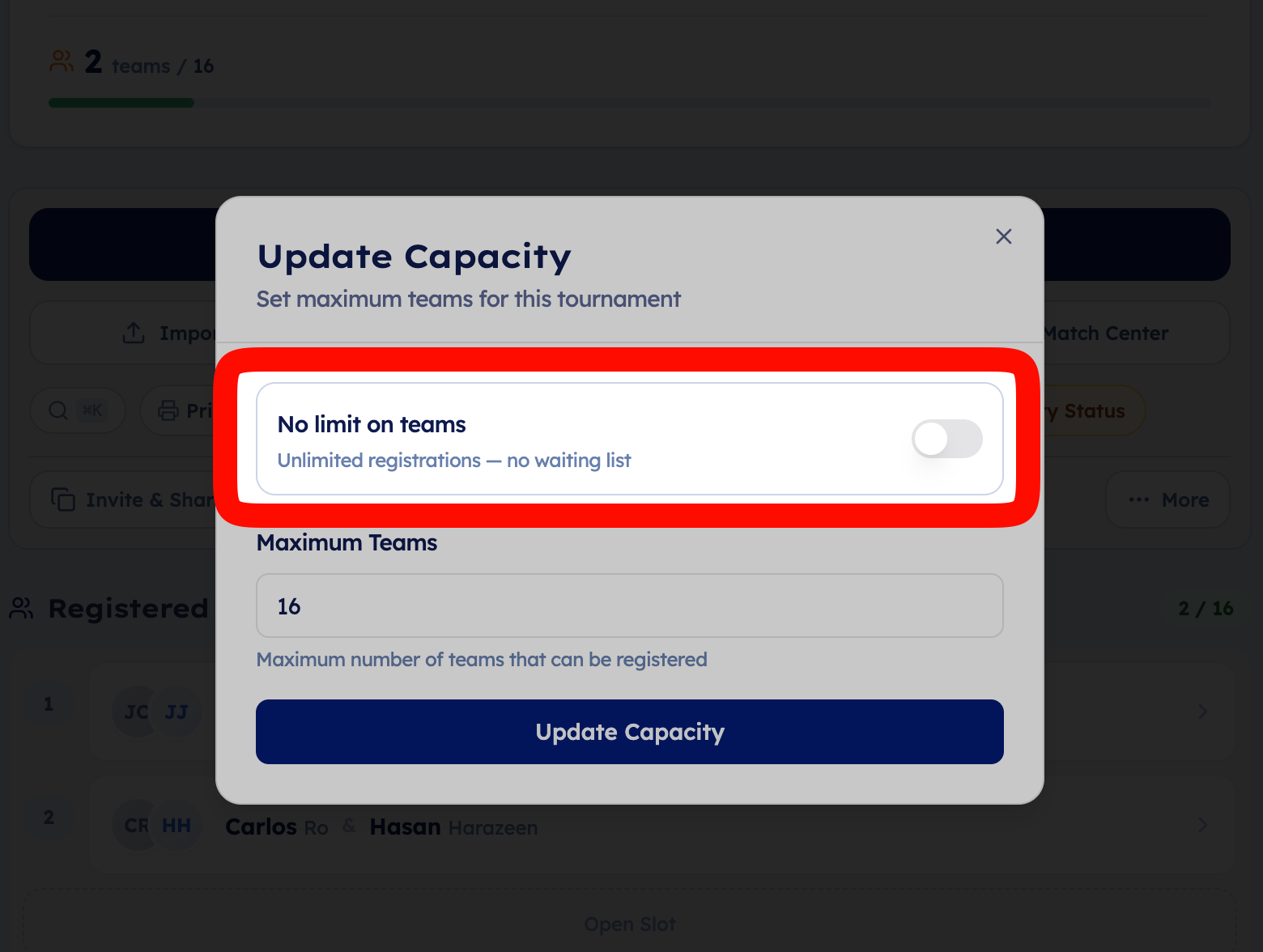
Organizers can now run tournaments with unlimited registrations.
If no capacity is set, the tournament will stay open with no player cap and no waitlist. This is useful for larger events, open signups, academies, communities, and tournaments where you do not want registration to stop at a fixed number.
If you still want a cap, just set a specific capacity as before. For example, setting capacity to 16 will keep the normal limit and waitlist flow.
Important: tournaments that did not previously have a capacity set are now treated as unlimited by default.
In short:
Empty capacity = unlimited registrations
No waitlist for unlimited tournaments
Set a number when you want a fixed cap
Existing capped tournaments continue working normally
May 29th, 2026
New
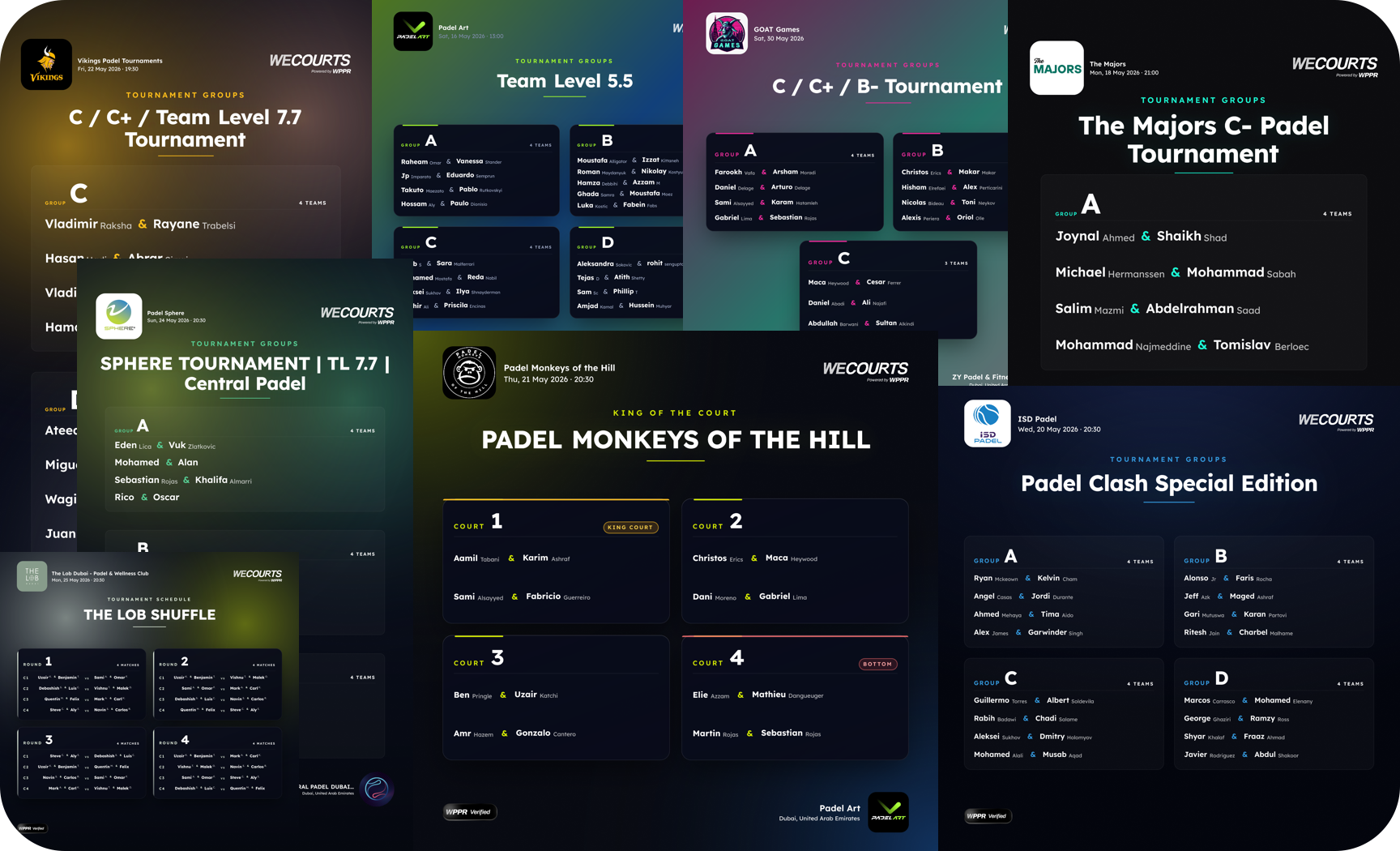
Promote your tournament in seconds — no design skills needed.
You can now generate branded, social-ready posters straight from your tournament lineup. Open any tournament, head to the Print Center, and tap the new Social Images card.
What's new
Two formats — Square (1080×1080) for feed posts and Portrait (1080×1920) for stories & WhatsApp status
🎨 5 themes — Classic, Court Lines, Glass, Aurora, and the new Spotlight scoreboard
🌈 40+ backgrounds — gradients, mesh, geometric patterns, and dark premium glows
🎯 Auto-branding — accent colors pulled straight from your tournament logo
📲 One-tap sharing — share to Instagram/WhatsApp via your phone's native share sheet, post multi-slide carousels, or download PNGs
📝 Ready-made captions — copy a tournament-specific caption with one tap
How to use it
Open your tournament → Print Center
Tap Social Images under "Promote your tournament"

Pick a format, theme, and background → preview → Share or Download

Available now for tournaments with group lineups.
May 29th, 2026
Improved
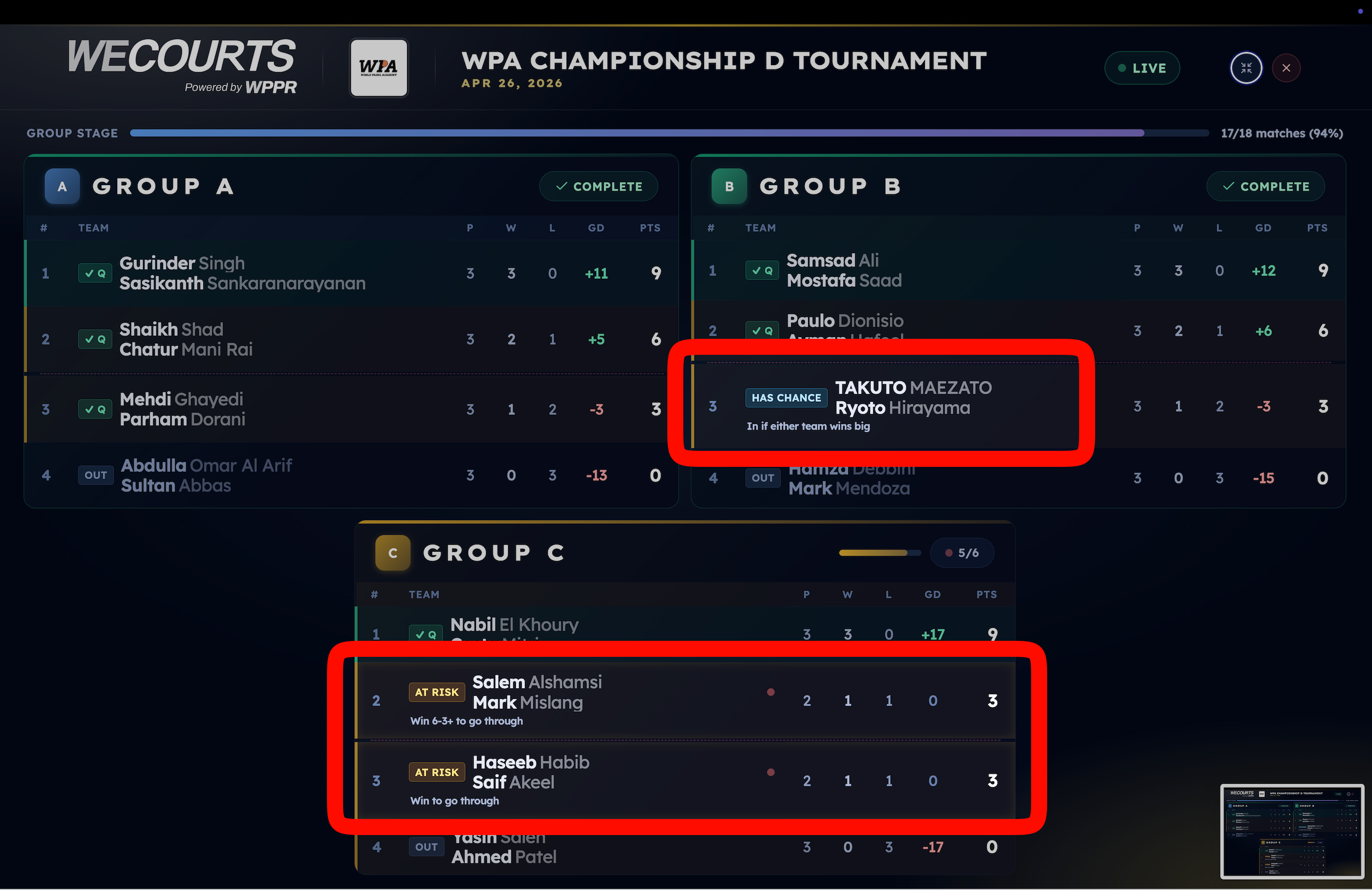
Your group stage just became must-watch TV.
WeCourts TV now reads your tournament while groups are still being played and shows the knockout bracket forming in real time — plus exactly what every team needs from the match in front of them.
What's new:
🪜 Live projected bracket — the knockout draw assembles itself on screen from current standings, before groups even finish. It's the real seeding engine, so what you see is exactly what the system will lock in.

🎯 "What they need" on every team — the standings now spell out the stakes: "Win 6-4+ to go through", "Out if either team wins big", "In if it stays close."

🔥 AT RISK / HAS CHANCE chips — instantly see who's clinging to a spot and who's about to steal one.

⚔️ Decider detection — when a single live match controls another group's fate (the best-3rd race), WeCourts TV knows, and lights it up.

⭐ Player Spotlight + auto-rotation — Standings, Bracket, and Spotlight rotate on their own, or tap to jump between them on any device.

All available on tournament page on wecourts and also on mobile app

How to use it: Open your tournament's /tv/:code link, cast it to the venue screen, and let it run. Works on the big screen, your laptop, and players' phones.
Available now on all groups + knockout tournaments. No setup required.
May 29th, 2026
New
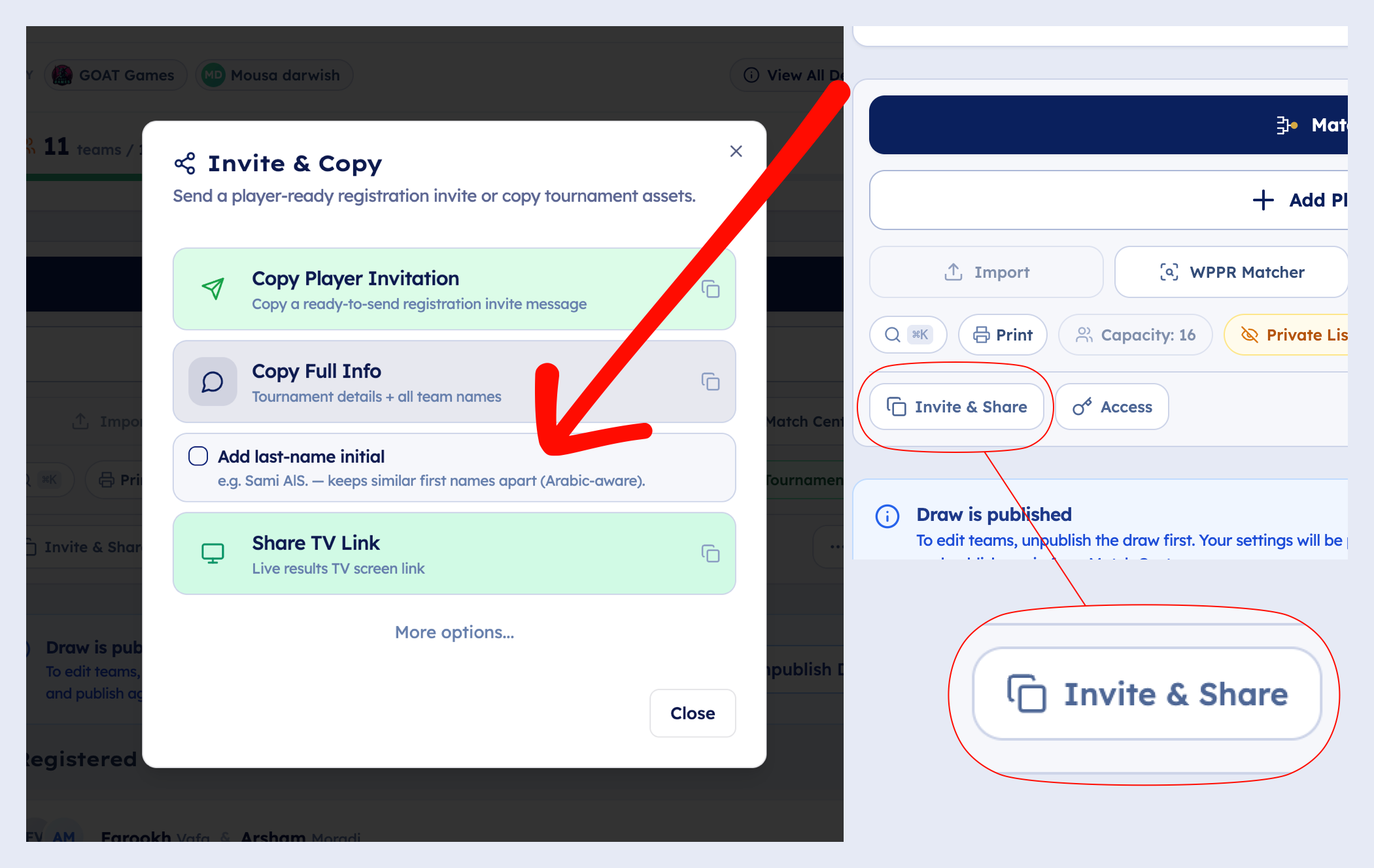

Posting your registration list to WhatsApp and ending up with five "Mohammad"s? Fixed.
The Share & Copy dialog now has an "Add last-name initial" toggle. Flip it on and every player gets a compact initial after their first name, so similar names stay apart at a glance.
What's new:
🔤 One-tap last-name initials — "Sami" becomes "Sami AlS." across the whole list.
🌍 Arabic-aware — Al-Sayyed → AlS., Al-Mansoori → AlM. They stay distinct instead of both becoming a meaningless "A.".
🧠 Auto-disambiguation — teammates with the same first name are split automatically ("Mohammad A. & Mohammad K."), toggle or not.
✨ Cleaner formatting — teammate separator is now a crisp /.
Before:
🎾 Jasha & Ali
🎾 Javier & Javier
After:
🎾 Jasha S  /  Ali AlS
🎾 Javier M  /  Javier R
Open Share & Copy → Copy Full Info, tick Add last-name initial. Off by default.

May 13th, 2026
New
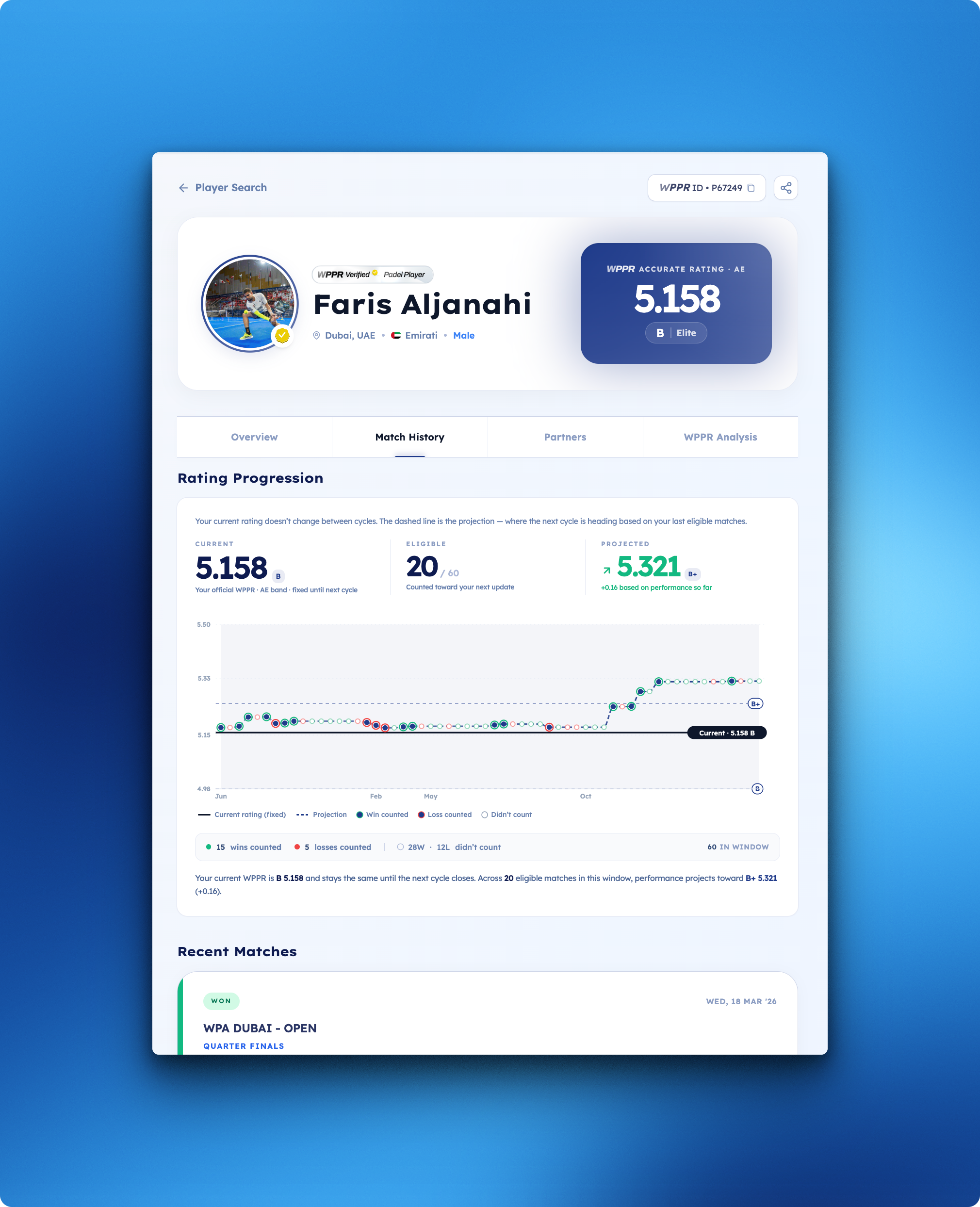
TL;DR: Match History now shows a complete visual story of your WPPR. Every match, every projection, every category boundary.
What's new:
📊 Match-by-match chart of your current rating cycle — wins, losses, eligibility, all on one screen

🎯 Projected next rating — see where your WPPR is heading before the cycle closes
👀 Tap any match for the full breakdown: partner, opponents, score, rating impact
✅ Transparency by default — every match clearly marked as counted or unrated, no black box
🌍 Country-aware — letter bands (D–, C, C+, B–…) follow your country's WPPR scheme
📱 Premium mobile UX — swipe through your history; the centered match auto-selects with a fish-eye focus. No tapping, just flow.

Where to find it: Your player profile → Match History tab

Why we built it: Your WPPR shouldn't be a number that just appears. You should see how every match shapes it and where you're heading next.
May 4th, 2026
New
Improved
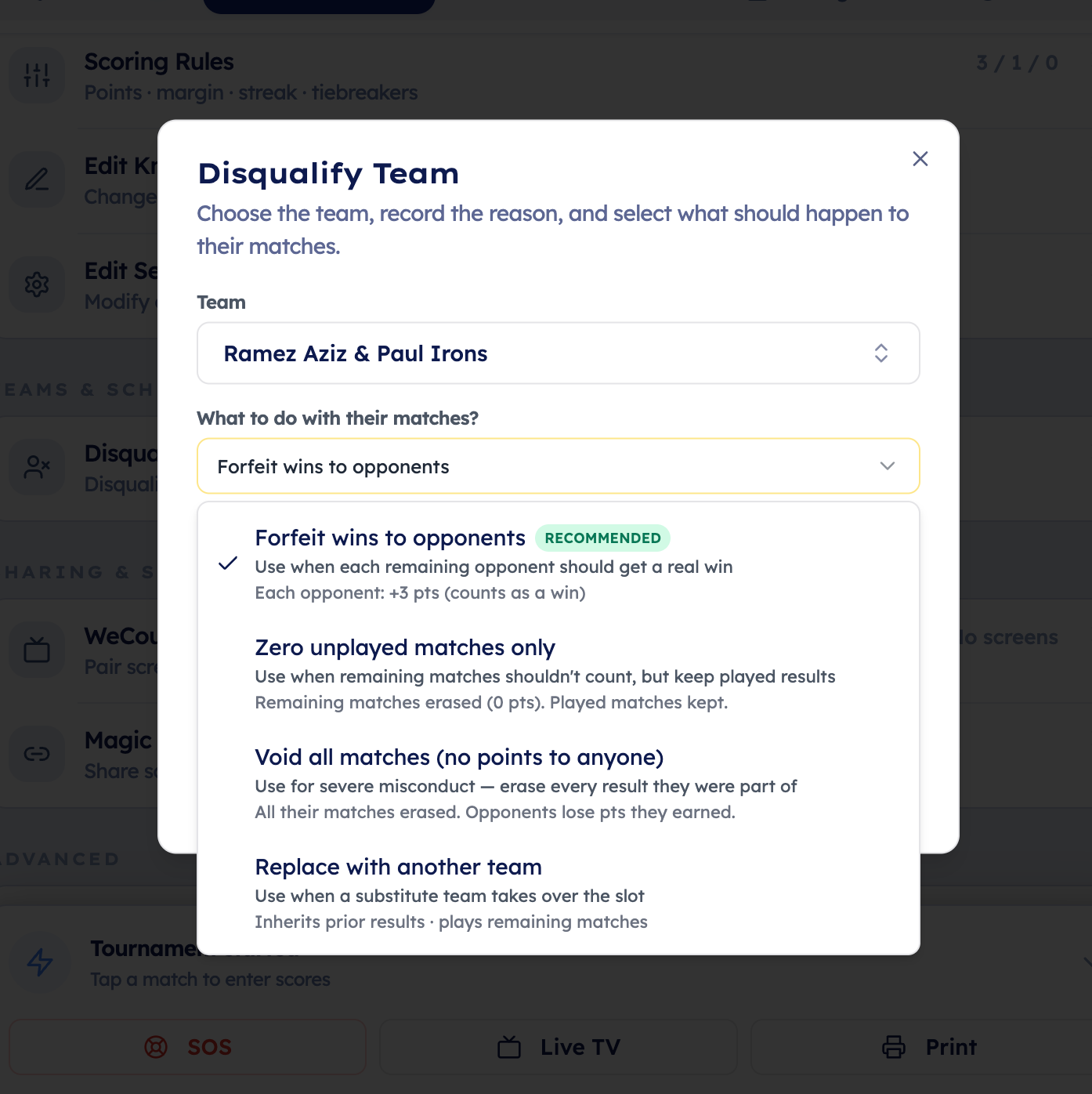
Organizers now have a clearer way to remove or disqualify a team during a tournament and decide exactly how that team’s matches should affect the standings.

Previously, removing a team could be confusing because the system did not give organizers enough control over how points should be calculated after the team was removed. This caused uncertainty around whether opponents should keep points, whether unplayed matches should count, and how standings should update.
Now, when an organizer removes or disqualifies a team, they can choose the correct outcome:
Give opponents forfeit wins
Use this when the removed team should lose their remaining matches.
Opponents receive win points.

Zero only unplayed matches
Use this when the team should be removed, but already completed matches should stay unchanged.
Remaining unplayed matches become 0-0.

Void all matches
Use this when the team’s full participation should be erased from standings.
Both played and unplayed matches involving that team are zeroed.
Opponents lose any points earned from those matches.

The standings now update based on the selected action, so organizers can handle no-shows, withdrawals, injuries, and disqualifications without manually guessing how points should be corrected.
May 4th, 2026
Improved
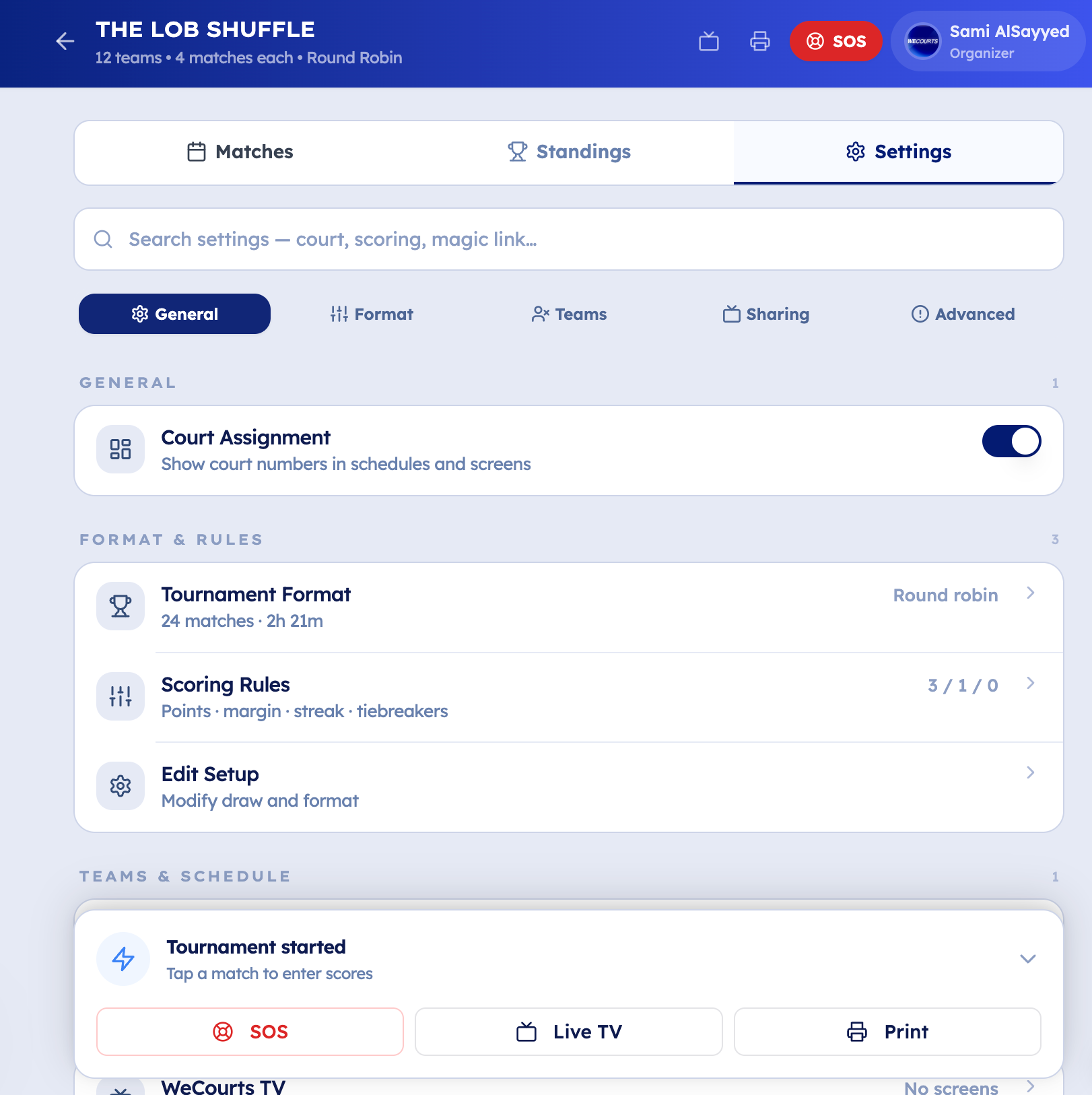
Scoring Settings tab is now a console-style interface with drilldown sheets for format, scoring, KOC, TV, magic links, DQ, incidents, seeds, advanced controls.
May 4th, 2026
New
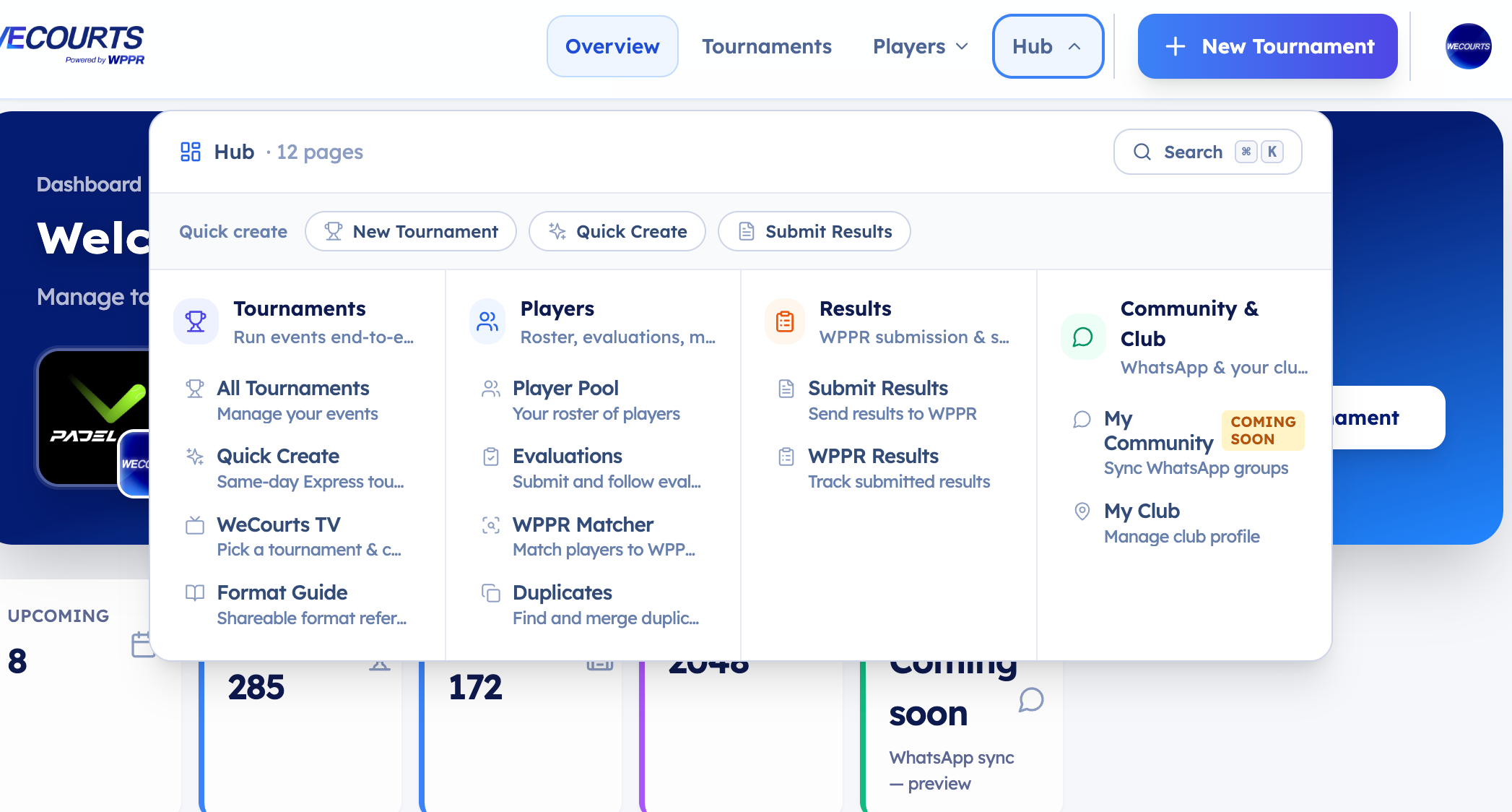
Organizer layout got a larger identity-aware Hub menu grouping community, players, results, club/company setup, etc.
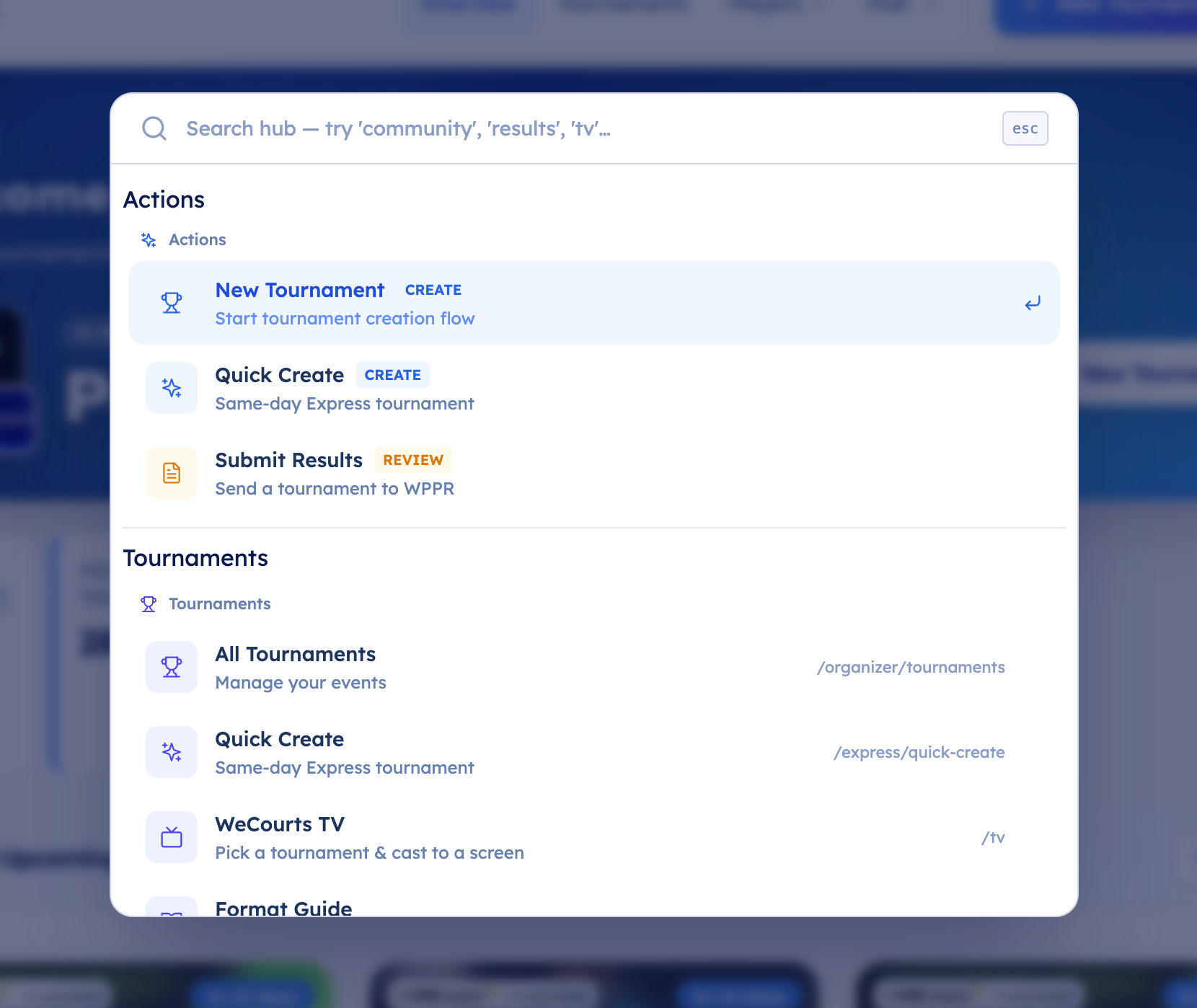
Organizer Command Palette
New global command palette for organizer workflows.
Finds organizer actions, players, tournaments, setup routes.
April 30th, 2026
New
Improved
Fixed
✨ New
Complete a partner's profile in one click Registered a partner with just their name? You'll now see a single Complete partner's profile card on your registration showing exactly what's missing (e.g. "Missing: full name, WhatsApp"). Open it once, fill in everything, done. Adding a mobile triggers WhatsApp verification automatically.
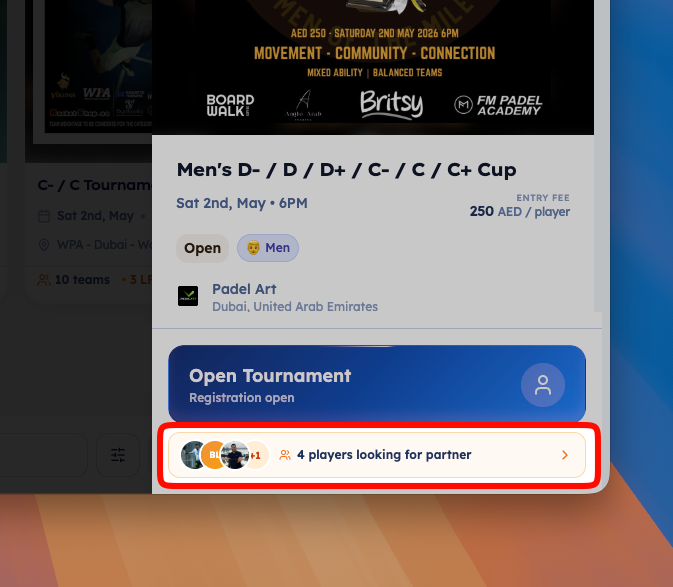
Looking-for-Partner spotlight on tournament cards When players are looking for partners, the tournament detail panel now shows a compact chip at the top with their photos and ratings. Tap it to jump straight to the full LFP list — no more scrolling past the poster.
Public LFP listings now show WPPR profiles Anyone browsing can see each Looking-for-Partner player's WPPR photo and rating to decide if it's a good match. Mobile numbers stay hidden until login.
Resubmit results after a waiver If a tournament's results were waived and you have new info, you can now reopen the submission. The button changes to Resubmit Results and a clear warning explains that the waiver will be revoked when you submit.
🚀 Improvements
Trusted organizers skip approval on duplicated tournaments Duplicating a tournament now respects your trust level — trusted organizers get an auto-approved copy ready to publish.
Action checklist stays useful after registration closes Joining the WhatsApp group and reminding your partner now stay actionable after registration closes or the tournament starts.
Smarter player-name review during results submission When you confirm a name and the match has a WPPR profile, the canonical name from WPPR is applied automatically — even for verified players. You'll see exactly which players couldn't be renamed and why.
Better WhatsApp message links Generic "View tournament:" CTAs in registration messages are now specific:
Solo registrants → Add a partner or track your registration
LFP listings → Manage your listing
Waitlist → Check your waitlist position
Match day → See match schedule and details
Top-seed picker opens automatically Tap "+ Add" to add a top seed and the team list appears instantly.
Stronger name validation We now reject obvious placeholders ("test", "tbd", "partner", "asdf"...) and keyboard mash. Real names with middle initials like Tameem Sultan K A Alalawi still pass.
Better phone number paste Pasting a number with a tel: prefix, hidden formatting, or before you've picked a country now normalizes correctly.
Partner ≠ you guard The form now blocks registering a partner with your own mobile number — caught before you submit.
Partner mobile masking Partner mobile numbers are now masked to the last 4 digits in some views for privacy.
"Create New" appears only after you start typing In partner search and Add Team, the "None of these. Create New" button stays hidden until there's something to search — no more empty manual forms.
🛠 Fixes
Dialogs always sit above the header and menus Standard dialogs, sheets, drawers, and confirmation modals could occasionally be overlapped by the site header or dropdown menus. They now reliably appear above all page chrome.
Loading indicator on tournament details The tournament detail panel now shows a progress strip while it's still fetching, so it's clear when more info is on the way.
Help link on waived tournaments Players landing on a waived tournament page now see a "Report something wrong" button that opens a WhatsApp message to the organizer.